
Walgreens does not have an official company-wide free WiFi policy for customers. There is no guaranteed public network at any Walgreens location. Some individual store managers choose to enable a local "Walgreens" WiFi network at their discretion, but this varies entirely by location. If you need WiFi at Walgreens, call your local store before visiting to confirm.
You are running low on data. You spot a Walgreens on the corner. A quick thought crosses your mind: does Walgreens have free WiFi? It is one of the most common in-store amenity questions for this pharmacy chain, and the honest answer is more nuanced than a simple yes or no.
In this guide, you will get a clear picture of the official Walgreens WiFi policy, how to check your specific location, a step-by-step connection guide, security tips, and the best backup options if your local store does not have public internet access.
Does Walgreens Have Free WiFi for Customers?
Walgreens does not have an official, company-wide free WiFi policy for customers. According to Walgreens Customer Service, there is no standardized program that guarantees public internet access at every store location.
That said, some Walgreens stores do offer a "Walgreens" WiFi network. Whether or not a particular location has it depends entirely on the individual store manager. Some managers enable a local hotspot; others do not. The coverage, speed, and connection requirements differ from store to store.
This is different from chains like Starbucks or McDonald's, which have formal, nationwide free WiFi programs that customers can rely on universally.
Key facts about Walgreens WiFi in 2026:
- No official company-wide free WiFi program exists for customers
- Some locations broadcast a "Walgreens" or "Walgreens Wi-Fi" network at manager discretion
- Walgreens official Terms of Use acknowledge in-store WiFi as a potential service, not a guarantee
- WiFi availability varies by region, store format, and network setup
- Over 8,500 Walgreens locations operate across the United States, and connectivity differs across all of them
Does Walgreens Have WiFi at Every Store?
No. Walgreens does not have WiFi at every store. Because there is no centralized WiFi rollout, you will find significant inconsistency:
- Stores in high-traffic urban areas are slightly more likely to offer a public network
- Drive-through-only or smaller format stores are less likely to have customer-facing WiFi
- Stores near college campuses or tech hubs may be more likely to have enabled it
- Walgreens Health hubs and flagship stores may offer better connectivity options
The only reliable way to confirm WiFi at your specific location is to check directly with the store before your visit.
How to Check If Your Local Walgreens Has Free WiFi
Before heading to Walgreens specifically for internet access, take one of these steps to confirm availability.
Option 1: Use the Walgreens Store Locator
Visit the Walgreens Store Locator and find your nearest location. The store detail page includes the phone number. Call ahead and ask a team member directly whether the store has free WiFi available for customers.
Option 2: Scan for the Network On Arrival
If you are already in the store, open your device WiFi settings and look for a network named "Walgreens" or "Walgreens Wi-Fi." If no such network appears, the store likely does not offer public internet access.
Option 3: Ask a Store Associate
Walking up to any Walgreens team member and asking is the fastest in-store method. They will know whether the local network is active and whether a password is required.
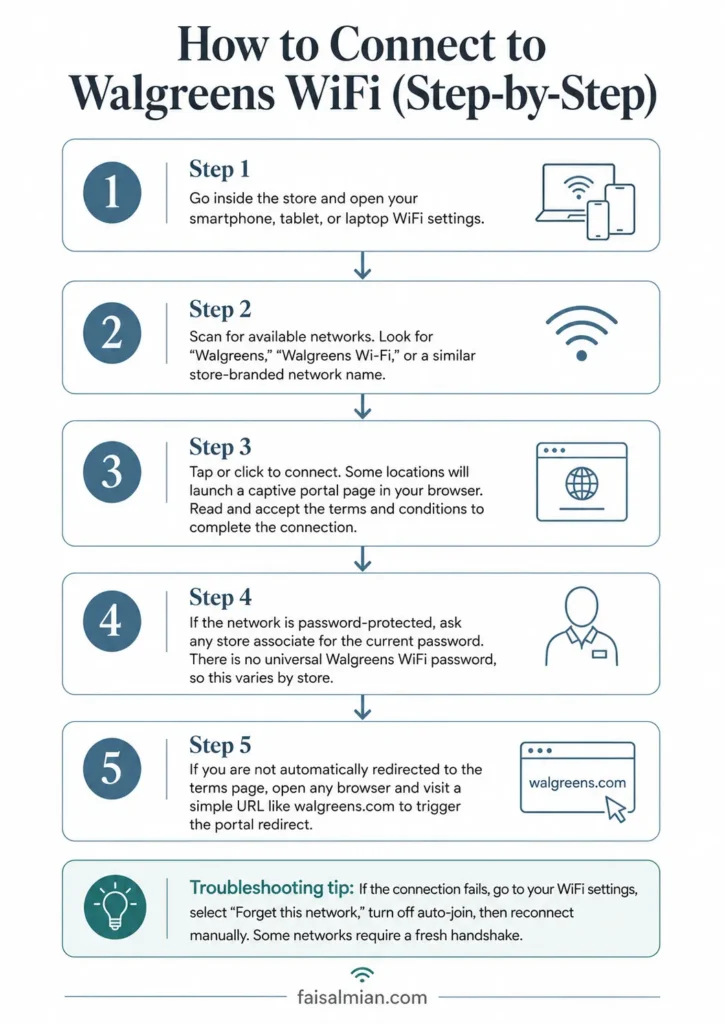
How to Connect to Walgreens WiFi (Step-by-Step)
If your local Walgreens does have a public network available, connecting is straightforward. Follow these steps:
Step 1: Go inside the store and open your smartphone, tablet, or laptop WiFi settings.
Step 2: Scan for available networks. Look for "Walgreens," "Walgreens Wi-Fi," or a similar store-branded network name.
Step 3: Tap or click to connect. Some locations will launch a captive portal page in your browser. Read and accept the terms and conditions to complete the connection.
Step 4: If the network is password-protected, ask any store associate for the current password. There is no universal Walgreens WiFi password, so this varies by store.
Step 5: If you are not automatically redirected to the terms page, open any browser and visit a simple URL like Walgreens.com to trigger the portal redirect.
Troubleshooting tip: If the connection fails, go to your WiFi settings, select "Forget this network," turn off auto-join, then reconnect manually. Some networks require a fresh handshake.
What Is the Walgreens WiFi Password?
There is no single universal Walgreens WiFi password. The password situation varies in three ways depending on the location:
No password required: Some stores broadcast a fully open public network that any customer can join without entering a password. This is the easiest setup but also less secure.
Password on request: Other stores keep the network password-protected and share it only with customers who ask. Approach any team member at the pharmacy counter or checkout to request access.
Time-limited sessions: A small number of locations enable timed sessions (typically 30-60 minutes) to prevent network congestion. If your connection drops after a set period, ask an associate to refresh your access.
Is Walgreens WiFi Safe to Use?
Public retail WiFi, including any Walgreens network, carries inherent security risks. Most public hotspots are either unencrypted (open) or use basic WPA2 security, meaning your data could be exposed to others on the same network.
What you should avoid on Walgreens WiFi:
- Logging into your bank account or financial apps
- Entering credit card numbers or making online purchases
- Accessing sensitive work documents or email accounts
- Entering your Walgreens account credentials on unfamiliar pages
What you can safely do:
- Browse the Walgreens app to manage prescriptions or find coupons
- Search for store products or weekly deals
- Use general web browsing for non-sensitive tasks
- Stream content that does not require personal logins
Best practice: Use a reputable VPN (Virtual Private Network) whenever connecting to any public network. A VPN encrypts your traffic so that other users on the same WiFi cannot intercept your data. Look for networks running WPA3 encryption if you want the highest standard of public WiFi security.
Walgreens WiFi vs. the Walgreens App
Even at locations where free WiFi is not available, Walgreens offers a robust mobile app that functions well on cellular data (4G and 5G networks). The Walgreens app lets you:
- Refill prescriptions and set pickup alerts
- Clip digital coupons and access myWalgreens loyalty rewards
- Browse weekly sale flyers and product availability
- Schedule flu shots, COVID-19 tests, and pharmacy appointments
- Sync online orders with in-store pickup
For most tasks you would want to do while in a Walgreens store, the app on your existing cellular data plan is a more reliable option than searching for a public WiFi network.
Does Walgreens Have WiFi for Employees?
Yes, Walgreens employees have access to a separate internal network used for store operations. This internal system supports point-of-sale registers, inventory management, and back-office communications. It is not accessible to customers and is entirely separate from any public-facing WiFi that a store manager may enable.
Walgreens team members are not permitted to share internal network credentials with customers, so asking an employee to log you into the staff network is not an option.
How Does Walgreens WiFi Compare to CVS and Rite Aid?
| Pharmacy Chain | Official WiFi Policy | Customer Access |
| Walgreens | No company-wide policy | Select locations only |
| CVS Pharmacy | No company-wide policy | Select locations only |
| Rite Aid | No company-wide policy | Rare, not reliable |
All three major pharmacy chains operate similarly when it comes to public WiFi: no guaranteed access, with occasional store-level exceptions. None of them compete with fast food chains or coffee shops in terms of consistent, nationwide free WiFi availability.
If reliable connectivity is your priority, pharmacy chains are generally not the right destination.
Best Alternatives to Walgreens WiFi
If your local Walgreens does not have free WiFi, these nearby options are far more reliable:
Retail and Fast Food Chains with Nationwide Free WiFi:
- Starbucks - Open WiFi at over 15,000 US locations, no purchase required
- McDonald's - Free WiFi at over 13,000 US locations, no password needed
- Target - Free in-store WiFi, sessions up to 4 hours
- Panera Bread - Unlimited free WiFi in-store
- Barnes and Noble - Free in-store WiFi with no time limit
- Best Buy - Open WiFi throughout all store locations
- Apple Store - Free WiFi, ideal for device-related tasks
- Whole Foods -- Amazon-powered WiFi at most locations
- Walmart - Free WiFi available at most Walmart Supercenter and Neighborhood Market stores
- Dollar General - Free WiFi at select locations
- Dunkin - Free WiFi in most US locations
- Marriott Hotels - Free WiFi in lobbies at most properties
Public Options:
Public libraries, airports, bus stations, community centers, hospital waiting areas, and many public parks in major US cities offer free public WiFi that requires no purchase and has no time limit.
Walgreens WiFi and Its In-Store Digital Ecosystem
Walgreens has invested in digital integration through its app and Walgreens Health platform rather than building out public WiFi infrastructure. The strategic focus is on connected services rather than free internet access.
Through the myWalgreens loyalty program and the Walgreens app, customers can access personalized deals, track prescription orders, and use digital health tools regardless of whether a local store has public WiFi.
Major pharmacy chains including CVS Health, Walgreens Boots Alliance, and Rite Aid have all prioritized app-based engagement and telehealth services as their primary digital channels in 2026, with in-store WiFi remaining secondary.
Final Word
Does Walgreens have free WiFi? The short, accurate answer is: not officially. Walgreens operates with no company-wide free WiFi program for customers. Individual stores may enable a local network at their manager's discretion, but you cannot count on it being available at any given location.
The smartest approach is to call your store ahead of time, use the Walgreens app for most in-store tasks over your cellular connection, and keep a list of reliable nearby alternatives like Starbucks or McDonald's for when you need guaranteed public internet access.
Before you visit Walgreens, check out these related guides:
Does Walgreens Accept WIC? - Benefits and payment eligibility guide
Does Walgreens Have an ATM? - Find out about cash access at your local store
Does Walgreens Offer Curbside Pickup? - Skip the line and collect your order from the parking lot
Does Walgreens Accept Venmo? - Learn which payment methods Walgreens supports
Does Walgreens Have Public Restrooms? - Another common in-store amenity question answered
Does Walgreens Offer Notary Services? - Find out what legal services are available
How to Refill a Prescription at Walgreens? - Step-by-step guide to managing your pharmacy needs
FAQs
Does Walgreens have free WiFi for customers?
Walgreens has no official company-wide free WiFi policy for customers. Individual store managers may enable a local WiFi network at their discretion, but this is not guaranteed at any location. Always call your local store or use the Walgreens store locator to confirm before visiting.
What is the Walgreens WiFi password?
There is no universal Walgreens WiFi password. At stores that do offer WiFi, the network name is typically "Walgreens" or "Walgreens Wi-Fi." Some locations require a password you can get from a store associate, while others broadcast an open public network with no password required.
How do I connect to Walgreens WiFi?
To connect to Walgreens WiFi: open your device WiFi settings inside the store, look for a network named "Walgreens" or "Walgreens Wi-Fi," select it, and accept the terms page that appears in your browser. If prompted for a password, ask a store team member. If no network appears, that store does not offer public WiFi.
Is Walgreens WiFi safe to use?
Walgreens WiFi, like most public retail networks, may be unencrypted or only partially secured. Avoid logging into bank accounts or entering passwords while connected. Use a VPN for added protection and look for WPA3-secured networks when possible.
Does Walgreens have WiFi for employees?
Yes, Walgreens employees have access to a separate internal network used for store operations. This is not accessible to customers and is entirely different from any public-facing WiFi a store manager may choose to enable.
Does CVS have free WiFi?
CVS Pharmacy has no official company-wide free WiFi policy either. Like Walgreens, select CVS locations may offer in-store connectivity at individual manager discretion. If you need pharmacy-adjacent WiFi, call your local CVS or Walgreens store directly to confirm.
Does Walgreens WiFi have a time limit?
Some individual stores that offer WiFi may impose a session time limit of 30 to 60 minutes to prevent network congestion. Time limits vary entirely by location and are set at store manager discretion.
Can I use Walgreens WiFi without making a purchase?
At Walgreens locations that do offer public WiFi, no purchase is required to connect. You simply need to be inside the store and locate the network. Walgreens terms of use note that customers are responsible for all device activity while using in-store WiFi.
Does Walgreens have a hotspot?
Walgreens does not offer a dedicated customer hotspot device or cellular-backed hotspot service in stores. The WiFi option at select locations is a standard local router network, not a dedicated mobile hotspot.
What stores near me have guaranteed free WiFi?
For guaranteed free WiFi, your most reliable retail options are Starbucks, McDonald's, Target, Panera Bread, Barnes and Noble, and Apple Stores. All of these chains offer consistent, nationwide free public WiFi that does not require a purchase.
Note: WiFi availability at Walgreens stores changes based on store management decisions and may not reflect the status at your specific location. Always verify directly with your local store. Information last verified May 2026.
